Wati vs WTbotBuilder
Explore the Best Alternative for WhatsApp Chatbot Builder

- Trusted by Thousands of Customers
- 30-Days Refund Guarantee
- Priority Support
WhatsApp is one of the top platforms for chatbot marketing in 2024. Two great tools for creating WhatsApp chatbots are Wati and WTbotBuilder.
Wati offers an intuitive interface and various features for chatbot creation, while WTbotBuilder provides advanced AI capabilities for personalized interactions. Both platforms have successfully helped businesses engage with customers through WhatsApp.
However, choosing the right chatbot marketing software can be difficult due to the extensive features each platform offers, making it challenging for non-technical users to make informed decisions.
In this blog, you will learn about the features and functionalities, as well as the pros and cons, of Wati and WTbotBuilder. Get ready for a comprehensive comparison of these two software options.
Table of Content
Wati vs. WTbotBuilder: A Complete Comparison
Before we begin the comparison, let me provide a brief introduction to these software platforms.
WTbotBuilder: WTbotBuilder is a multi-channel chatbot and marketing platform that leverages the WhatsApp Business API to integrate WhatsApp into its services. It offers tools such as WhatsApp Broadcasting, WhatsApp Catalogs, WhatsApp Pay, and various other features for managing interactions at a large scale. In addition to WhatsApp, WTbotBuilder also provides chatbot and marketing tools for Telegram by default.
Wati: Wati is a WhatsApp chatbot marketing software designed to automate WhatsApp messaging, manage conversations, and provide analytics to enhance customer service. It includes features such as WhatsApp chatbots, shared team inboxes, catalogs, broadcast messages, and custom notifications.
Now, let’s begin a side-by-side comparison of the major features of these two software platforms.
Features


|
Channels
|
WhatsApp only
|
WhatsApp, Telegram
|
|
Pricing
|
No free plan, higher monthly fees starting with Rs.25, 370.89 |
Free plan, lower monthly fees starting with Rs.4,999 |
|
Chatbot Feature
|
Drag-and-drop flow builder, fewer components |
Drag-and-drop flow builder, many components (AI Reply, Interactive) |
|
Subscriber Manager
|
Less detailed information, single account management |
Detailed subscriber information, multi-channel management |
|
AI Feature
|
Requires additional plugin, no Rewrite with AI in Live Chat |
Built-in, Rewrite with AI in Live Chat
|
|
Webhook Workflow
|
Wide range of applications
|
Focus on Shopify and WooCommerce automation along with other vast api connection |
|
Live Chat
|
Basic features
|
Advanced features (Team Collaboration , Analytics) |
|
Integrations
|
Hubspot, Zoho, Pabbly
|
Popular tools like Google Sheets, Zapier, Shopify, WooCommerce |
|
Support
|
Documentation, Youtube channel (less frequent updates), slower support team |
Documentation, Youtube tutorials, forum, responsive support team |
While both Wati and WTbotBuilder are powerful tools for creating WhatsApp chatbots, there are key differences between them that make WTbotBuilder a better option.
- Trusted by Thousands of Customers
- 30-Days Refund Guarantee
- Priority Support
Multichannel Chatbot
WTbotBuilder: WTbotBuilder is a multi-channel chatbot software that allows you to build AI-powered chatbots for platforms such as WhatsApp, and Telegram. In addition to chatbot functionality, WTbotBuilder offers features like broadcasting, live chat, a subscriber manager, and many more capabilities for all these platforms—all within a single software solution.
Wati: Wati specializes solely in building chatbots for WhatsApp, along with other marketing tools that you can learn more about later in this blog.
User Interface
A user-friendly interface is vital when selecting WhatsApp chat software. Even the most feature-rich options can be ineffective if they are confusing to use. Check for ease of use before purchasing, as a complicated interface may lead to challenges down the line.
Let’s take a look at the WTbotBuilder Dashboard first:
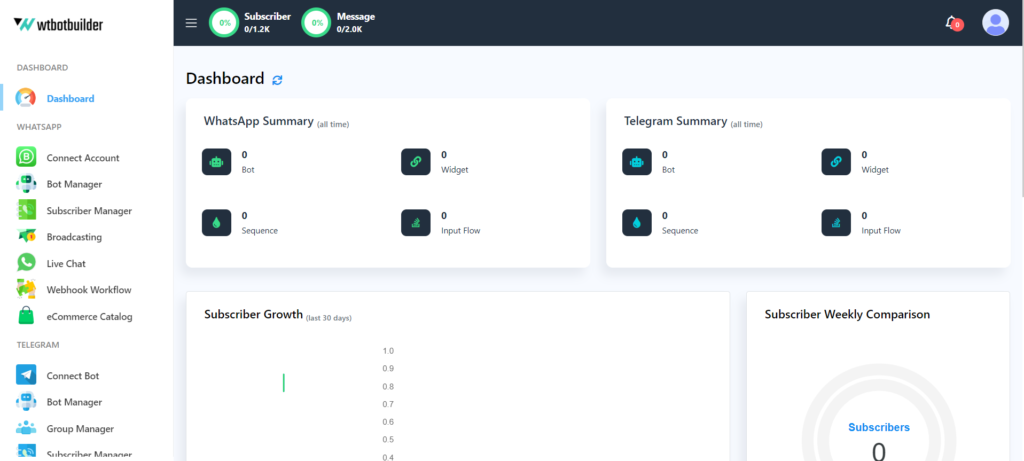
As you can see, WTbotBuilder’s interface is organized into distinct sections for each channel. We’ll explore other options in more detail shortly.
Now let’s see Wati’s User Interface:
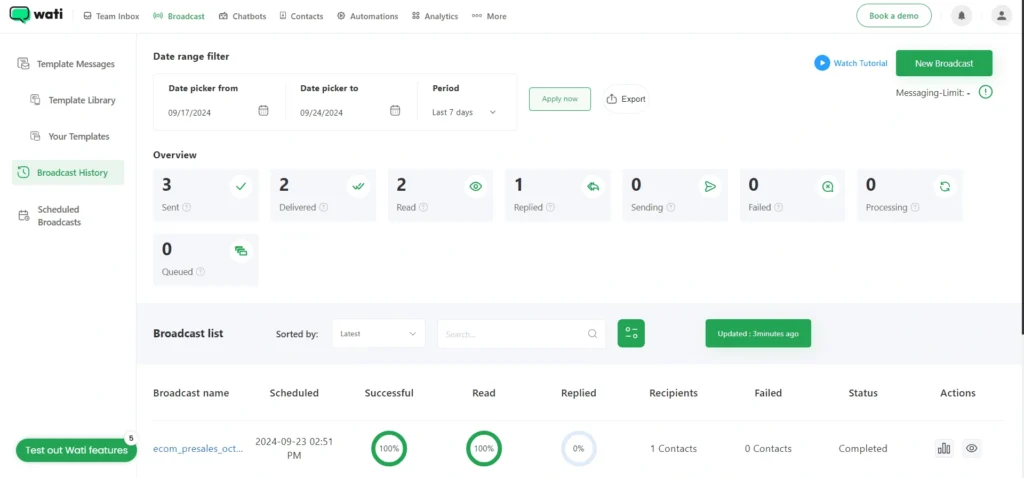
Wati offers WhatsApp-specific services only, so there’s no separate dashboard. Upon logging in, you’re immediately directed to the Team Inbox. From there, you’ll find options like Broadcast, Chatbots, and more along the top of the window.
Both Wati and WTbotBuilder have done an excellent job of organizing their service options, resulting in user-friendly interfaces. Any user can smoothly navigate and find the necessary services they need. So in the User Interface category, both Wati and WTbotBuilder get 5 stars.
- Trusted by Thousands of Customers
- 30-Days Refund Guarantee
- Priority Support
User Interface
⭐⭐⭐⭐⭐
⭐⭐⭐⭐⭐
Chatbot Builder
Both Wati and WTbotBuilder feature a built-in drag-and-drop flow builder. Below are the details for each platform’s flow builder.
WTbotBuilder
WTbotBuilder’s flow builder is user-friendly, allowing you to easily create chatbots by dragging and connecting components on the canvas. A trigger component, along with other blocks, composes the chat automation.
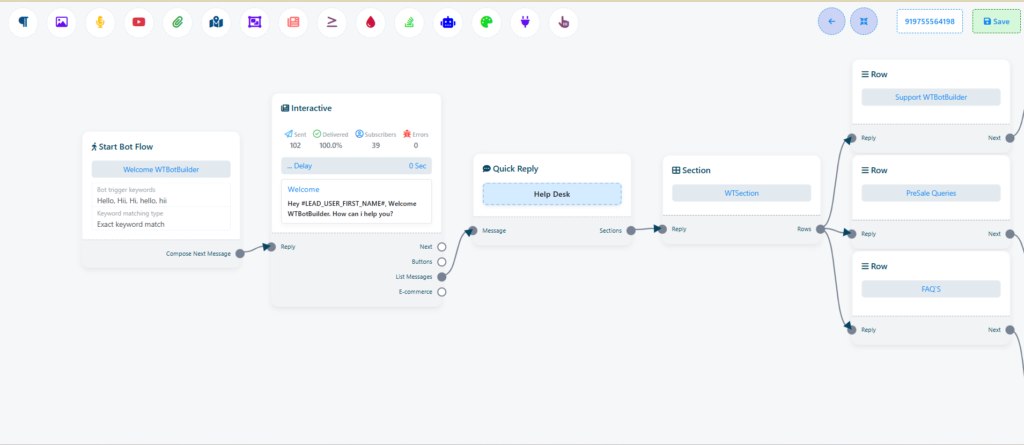
You can organize components with the rearrange button in the top right corner, which is helpful for complex bots. The clone option lets you quickly copy and paste repetitive components for efficient building
WTbotBuilder also supports exporting and importing bots, as well as connecting a copied bot to another bot’s flow.
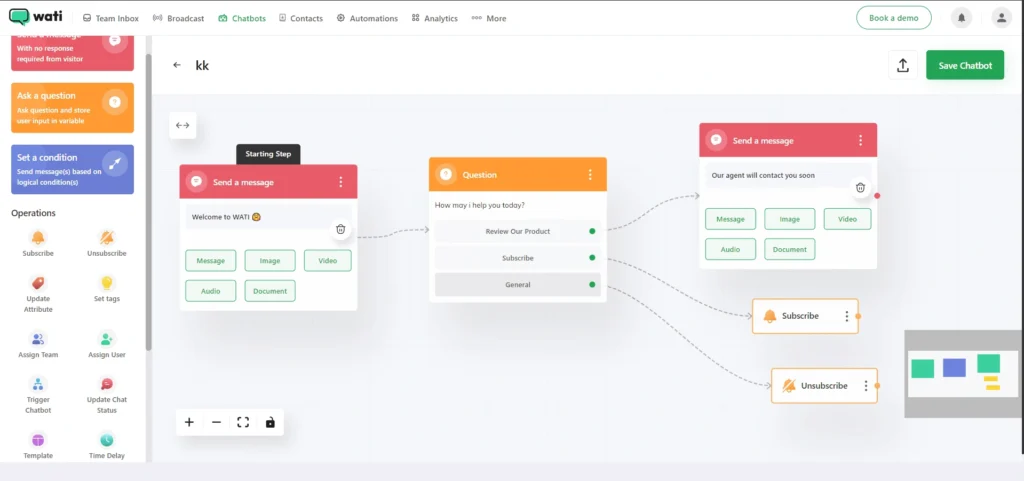
Wati
On the other hand, Wati also provides a drag-and-drop flow builder for creating chatbots. However, compared to WTbotBuilder, Wati’s flow builder is somewhat more complex to use. While you can drag and drop components in Wati, WTbotBuilder’s interface is more user-friendly and intuitive. Furthermore, WTbotBuilder offers more customization options for designing chatbot flows.
Chatbot Components
Both WTbotBuilder and Wati share similar chatbot components, but WTbotBuilder offers more advanced features than Wati.
For instance, WTbotBuilder includes an AI reply feature that allows your chatbot to engage with customers even when their questions don’t match any predefined templates. This feature is particularly beneficial because it enables your chatbot to respond to customers without any delay.
To set it up, all you need to do is train your AI reply component in the flow builder, and you’re ready to go. Below is a side-by-side comparison of the chatbot components offered by Wati and WTbotBuilder :
Text
✔️yes
✔️yes
Image
✔️yes
✔️yes
Video
✔️yes
✔️yes
Audio
✔️yes
✔️yes
Attachment
✔️yes
✔️yes
AI Reply
❌no
✔️yes
User Input Flow
✔️yes
✔️yes
Interactive
✔️yes
✔️yes
HTTP API
❌No
✔️yes
Live Chat
✔️yes
✔️yes
Assign Team Member
✔️yes
✔️yes
Template
✔️yes
✔️yes
Time Delay
✔️yes
✔️yes
Webhook
✔️yes
✔️yes
WhatsApp Flows Form
✔️yes
✔️yes
Catalog
✔️yes
✔️yes
Both WTbotBuilder and Wati offer similar chatbot components; however, WTbotBuilder stands out because of its superior AI reply and interactive features in its drag-and-drop chatbot builder. These functionalities can greatly assist customers in their daily marketing tasks. Therefore, WTbotBuilder is the winner in this comparison.
Be sure to check out WTbotBuilder’s YouTube video titled “Overview of Creating an Interactive WhatsApp Chatbot using WTbotBuilder“
- Trusted by Thousands of Customers
- 30-Days Refund Guarantee
- Priority Support
Subscriber Manager Comparison
Now, let’s compare the subscriber management features of Wati and WTbotBuilder to see which one comes out on top.
WTbotBuilder
WTbotBuilder’s subscriber management section is user-friendly, allowing you to view all subscribers who have interacted with your chatbot in one overview. You can segment subscribers with multiple tags and easily start a live chat by clicking the “Go to Live Chat” button. The platform also supports adding or deleting multiple subscribers at once.
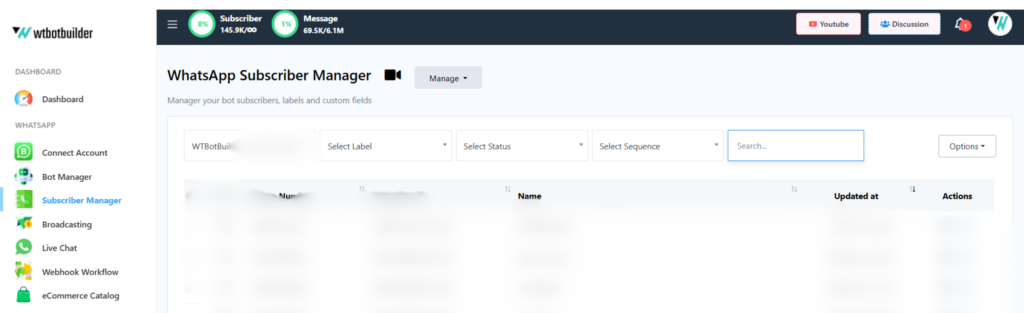
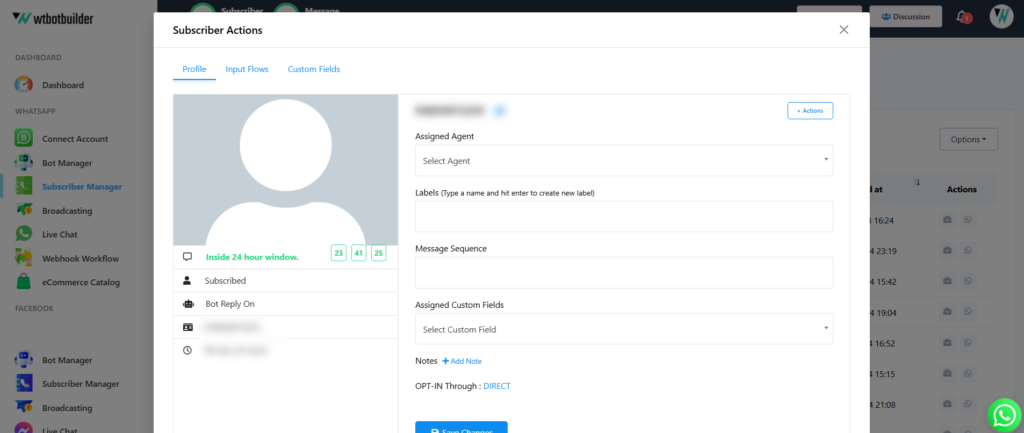
One-click lets you access a subscriber’s complete details, including custom fields and input flows, as well as their status within the WhatsApp 24-hour window. You can also see the assigned human agent. This streamlined access to information enhances your efficiency and improves customer support.
Wati
Wati features a subscriber manager similar to WTbotBuilder, called the contact page. Upon entering the subscriber manager page, you can see all subscribers organized in one overview.
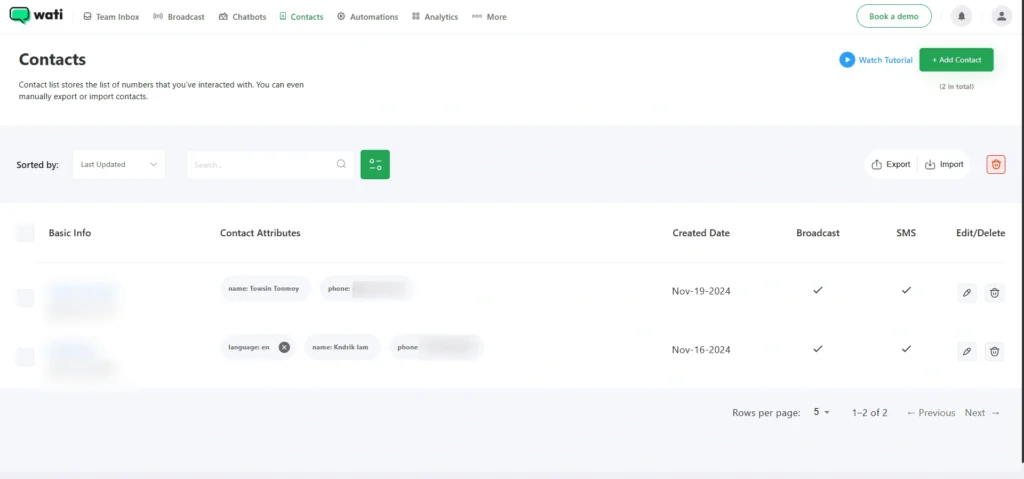
Wati lacks a crucial feature that is available in WTbotBuilder: the ability to add multiple WhatsApp accounts and view all their subscriber lists in one interface. This feature helps maintain organization, and in a business context, increased organization often leads to greater productivity.
Another area where WTbotBuilder excels is the “Go to Live Chat” feature. With WTbotBuilder, you can initiate a conversation in live chat or check chat history with just one click. In contrast, Wati does not offer this convenience. Instead, you must first navigate to Live Chat, search for the customer, and then you can start a conversation or access relevant chat history.
- Trusted by Thousands of Customers
- 30-Days Refund Guarantee
- Priority Support
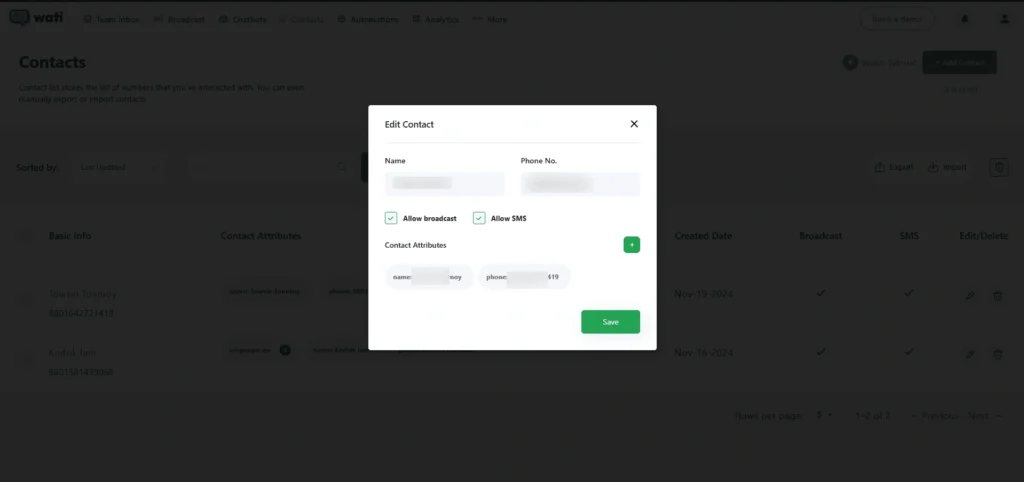
However, Wati does have a strong advantage regarding subscriber details. When you click on any subscriber’s name, a pop-up window appears, displaying all their user information, including custom fields, tags, and any notes made by the agent.
Subscriber Manager Comparison In Short:
Subscriber Overview
⭐⭐⭐
⭐⭐⭐⭐⭐
Custom Fields
⭐⭐⭐⭐⭐
⭐⭐⭐⭐⭐
User Segment
⭐⭐⭐⭐
⭐⭐⭐⭐⭐
AI Feature
WTbotBuilder
WTbotBuilder AI capabilities range from chatbot to live chat. Unlike regular chatbots, which are triggered by specific keywords, WTbotBuilder can respond intelligently even when user replies do not match predefined templates. By integrating an AI component into a standard chatbot, you can achieve full automation. This means that if a customer’s response deviates from the bot’s template, the AI will take over and address the customer’s query appropriately.
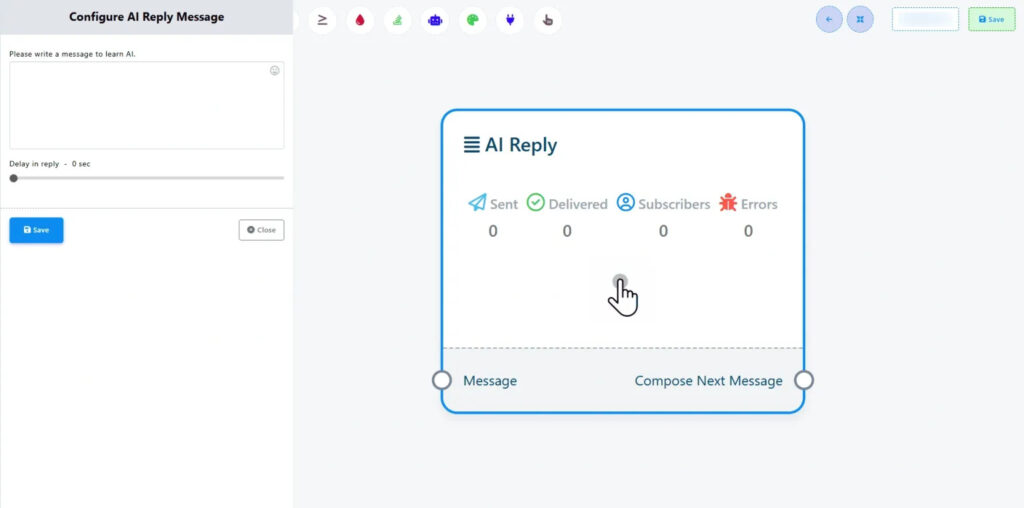
WTbotBuilder’s live chat features AI capabilities. With the Live Chat Rewrite with AI feature, you can correct your grammatical mistakes in just one click while providing customer support.
Watch the WTbotBuilder YouTube video on the AI Chatbot:
Wati
Wati also offers AI capabilities for its chatbot, similar to WTbotBuilder. However, unlike WTbotBuilder, Wati’s AI features are not built-in; you need to install an additional plugin to access them. Additionally, Wati does not offer any AI-assisted rewriting features during live chat. Therefore, WTbotBuilder provides a better AI experience for its users compared to Wati.
Subscriber Overview
⭐⭐⭐
⭐⭐⭐⭐⭐
- Trusted by Thousands of Customers
- 30-Days Refund Guarantee
- Priority Support
Webhook Workflow
Both WTbotBuilder and Wati offer robust Webhook Workflow features. However, each platform has distinct strengths and focus areas. We will now examine the strengths and weaknesses of both platforms.
WTbotBuilder
The Webhook Workflow connects WTbotBuilder with real-time third-party software to automate various WhatsApp operations. This feature effectively automates order updates, shipment notifications, and other transactional messages in e-commerce businesses. Additionally, it can be used to automate any other application as long as the third-party software supports webhooks.
Key features:
- E-commerce Integrations: Easily integrate WTbotBuilder with platforms like Shopify and WooCommerce to automate order updates and send notifications via WhatsApp.
- Customizable Templates: Create personalized message templates for various order updates according to your preferences.
- Real-time Updates: Send order notifications immediately when events occur, which helps build trust and reliability with your customers.
- Advanced Workflows: Develop complex workflows to manage specific scenarios effectively.
- Workflow Analytics: Utilize the advanced workflow reporting option to analyze every campaign in depth.
- API Access: Enjoy extensive API access for advanced customization and integration.
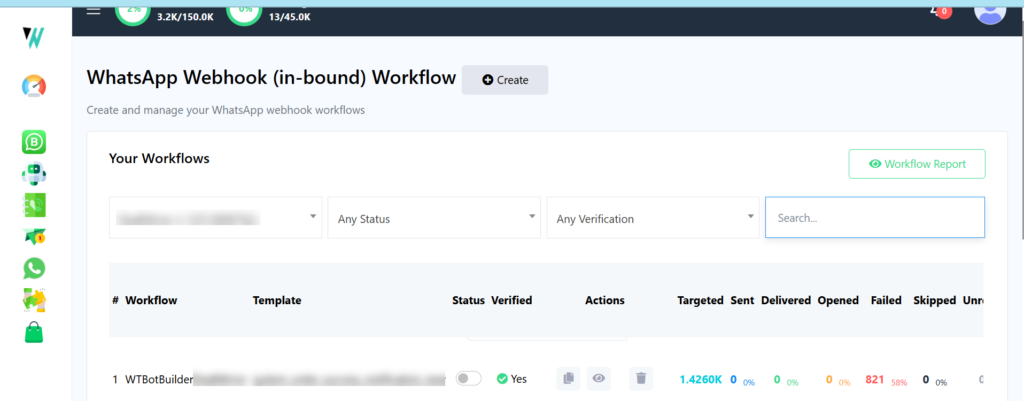
Wati
Similar to WTbotBuilder, Wati also has very capable and versatile Webhook features that can be used for a wider range of applications.
Key features include:
- Message Triggers: Receive notifications for various events like incoming messages, message delivery, and template message failures.
- Workflow Automation: Trigger actions based on specific events, such as sending automated replies or escalating issues.
- API Access: Extensive API access for advanced customization and integration.
- Trusted by Thousands of Customers
- 30-Days Refund Guarantee
- Priority Support
Live Chat
WTbotBuilder
WTbotBuilder Live Chat is a real-time chat tool that lets you directly interact with your WhatsApp chatbot subscribers. This means you can view and take control of any conversation that your WhatsApp chatbot has had with a customer. This feature allows you to monitor conversations, intervene when necessary, and manage your subscriber list all within a single interface.
WTbotBuilder Live Chat is very advanced in comparison with Wati’s Live Chat.
Here are the key features of WTbotBuilder’s Live Chat:
- Team Collaboration: Allows multiple agents to work together on customer queries, enhancing overall efficiency.
- Analytics and Reporting: Provides detailed insights into customer interactions and team performance.
- Subscriber List: Offers a comprehensive view of all your WhatsApp subscribers, making it easy to manage and organize them in one place.
- Follow-Up Reminder: This enables you to schedule reminders for following up with customers later.
- Translate Message: Facilitates the translation of messages between languages for improved understanding.
- Rewrite with AI: Automatically generates suitable responses.
- Send Flows or Message Templates: Allows you to use pre-written message sequences for efficient communication.
- Canned Responses: Quickly insert standard pre-written messages to save time.
- Assign Agent: Designate specific agents to handle particular customer inquiries.
- Add Labels: Categorize customers for various services for better organization.
- Add Notes: Include notes in customer conversations, helping other agents to quickly catch up.
- Inside 24-Hour Window: According to WhatsApp policy, you can only message a customer who has contacted you within the last 24 hours. This feature helps you track the 24-hour messaging window.
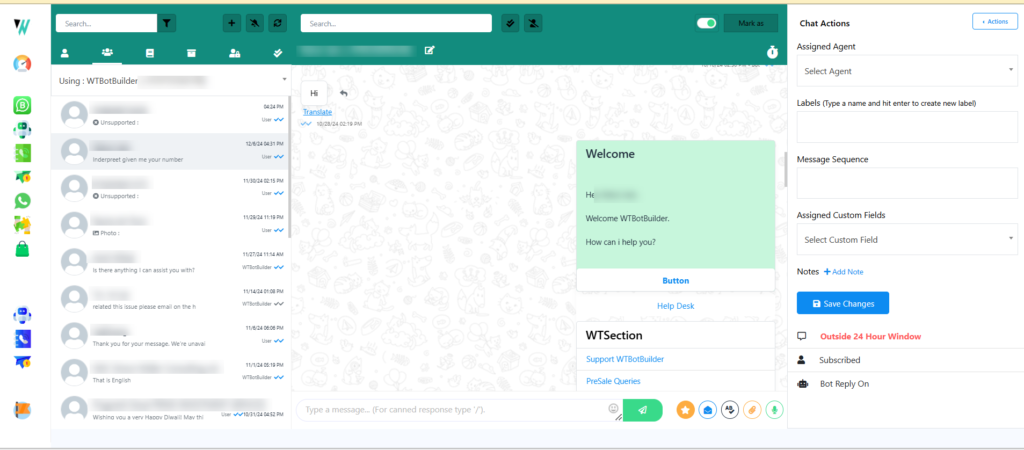
Wati
Wati has named their Live Chat feature “Team Inbox.” Wati’s Team Inbox provides a variety of features to enhance communication between businesses and their customers.
- Centralized Communication Hub: A single platform for all team members to access and respond to customer messages.
- Internal Notes: Add private notes to messages for internal reference and collaboration.
- Status Updates: Set status updates to indicate availability and workload.
- File Sharing: Share files directly within the chat for seamless communication.
Live Chat Comparison
Default Live Chat
✔️yes
✔️yes
AI Features
❌No
✔️yes
Team Member assign
✔️yes
✔️yes
- Trusted by Thousands of Customers
- 30-Days Refund Guarantee
- Priority Support
Channels
WTbotBuilder
With WTbotBuilder, you can create chatbots for WhatsApp, and Telegram from a single interface. Even if you focus primarily on WhatsApp marketing, WTbotBuilder’s multi-channel approach can help you grow your business across other channels as well.
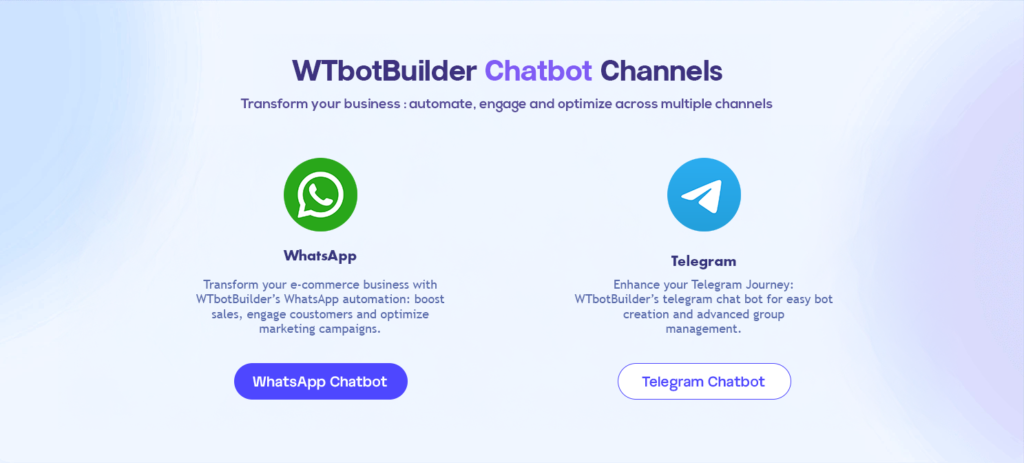
Wati
Wati only has a single channel, which is WhatsApp. Unlike WTbotBuilder they only provide features for WhatsApp Chatbots.
WTbotBuilder
Multi Channel
❌No
✔️yes
Integrations
In terms of integrations, Both Wati and WTbotBuilder are equally great.
WTbotBuilder
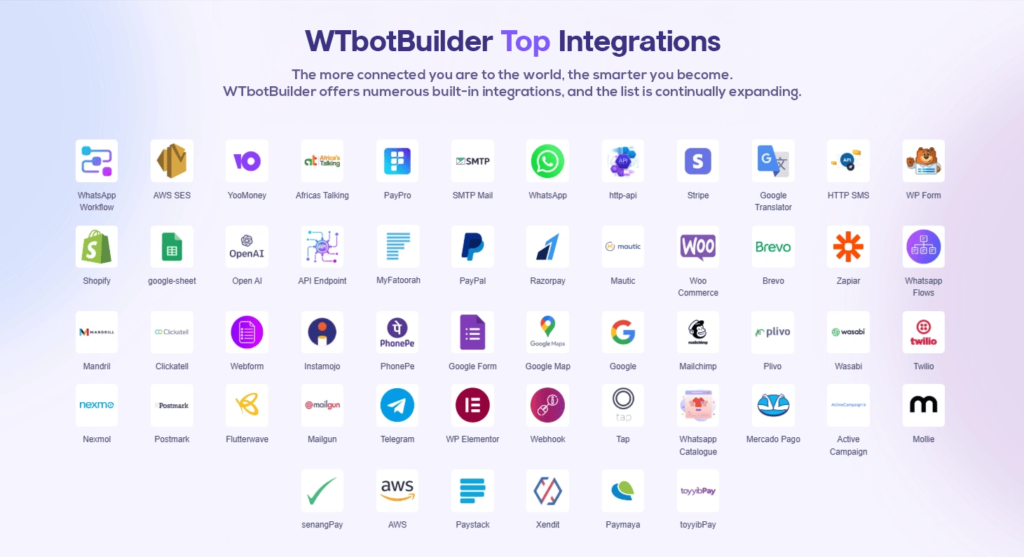
WTbotBuilder provides a variety of powerful integrations to enhance your chatbot’s functionalities. You can connect with popular tools such as Google Sheets for easy and accessible data management, Zapier to automate workflows, and HTTP APIs to access external data sources. Additionally, you can integrate with Shopify and WooCommerce to send order updates directly to customers on WhatsApp, among many other options.
By utilizing these integrations, you can develop more advanced and efficient chatbots that deliver exceptional customer experiences and drive business growth.
Wati
Wati offers a strong integration that greatly enhances the functionality of its chatbots and streamlines business operations. By connecting with various tools and platforms like Zoho and HubSpot, Wati enables businesses to automate workflows, centralize customer interactions, and improve efficiency.
Pricing
In terms of pricing, WTbotBuilder is a clear winner over here.
WTbotBuilder
WTbotBuilder offers a one-time payment option for a lifetime plan, which includes unlimited bot building, unlimited live chat access, and the ability to add up to 1,000 subscribers. This plan also provides enhanced features and greater capacity.
Users of the premium plan gain access to advanced functionalities, such as AI-powered bot responses, live chat translation, input flow campaigns, and more. Additionally, the premium plan offers a high user account limit and generous message credits.
Advanced features include WhatsApp integrations, API access, and customization options.
The minimum price to access the lifetime plan is just Rs. 4,999.
Choose the plan that best fits your business needs!
WTbotBuilder Tier 1
₹4,999/One-Time Fee
- Subscribers 25K
- Connect Account : 5
- Number of Messages : 25K / Month
- Unlimited Bot Conditional Reply
- Unlimited Bot Message Insight
- Unlimited Input Flow Campaign
- Unlimited Live Chat
- Unlimited Broadcast
- 50 Sequence Campaign
- Unlimited Telegram - Group Management
- Unlimited API Integration
- WhatsApp - eCommerce Catalog : 3
- WhatsApp - Webhook Workflow : 3
- WhatsApp - WordPress/Shopify Integration : 3
- Telegram - Native eCommerce Store : 6
- Chat Widget : WTBotBuilder
- Team Members
- Live Chat - Advanced
WTbotBuilder Tier 2
₹8,999 /One-Time Fee
- Subscribers 45K
- Connect Account : 10
- Number of Messages : 45K / Month
- Unlimited Bot Conditional Reply
- Unlimited Bot Message Insight
- Unlimited Input Flow Campaign
- Unlimited Live Chat
- Unlimited Broadcast
- 50 Sequence Campaign
- Unlimited Telegram - Group Management
- Unlimited API Integration
- WhatsApp - eCommerce Catalog : 6
- WhatsApp - Webhook Workflow : 6
- WhatsApp - WordPress/Shopify Integration : 6
- Telegram - Native eCommerce Store : 12
- Chat Widget : WTBotBuilder
- Team Members
- Live Chat - Advanced
Reseller Plan
₹49,999/One-Time Fee
- UNLIMITED SUB-ACCOUNTS
- Each Sub-account comes with 👇
- Subscribers 25K
- Connect Account : 5
- Number of Messages : 25K / Month
- Unlimited Bot Conditional Reply
- Unlimited Bot Message Insight
- Unlimited Input Flow Campaign
- Unlimited Live Chat
- Unlimited Broadcast
- 50 Sequence Campaign
- Unlimited Telegram - Group Management
- Unlimited API Integration
- WhatsApp - eCommerce Catalog : 3
- WhatsApp - Webhook Workflow : 3
- WhatsApp - WordPress/Shopify Integration : 3
- Telegram - Native eCommerce Store : 6
- Chat Widget : WTBotBuilder
You can just discover premium features at a price that works for you. Clear pricing with no setup fees!
Limited time offer
For detailed pricing plans, check out WTbotBuilder’s website.
Wati
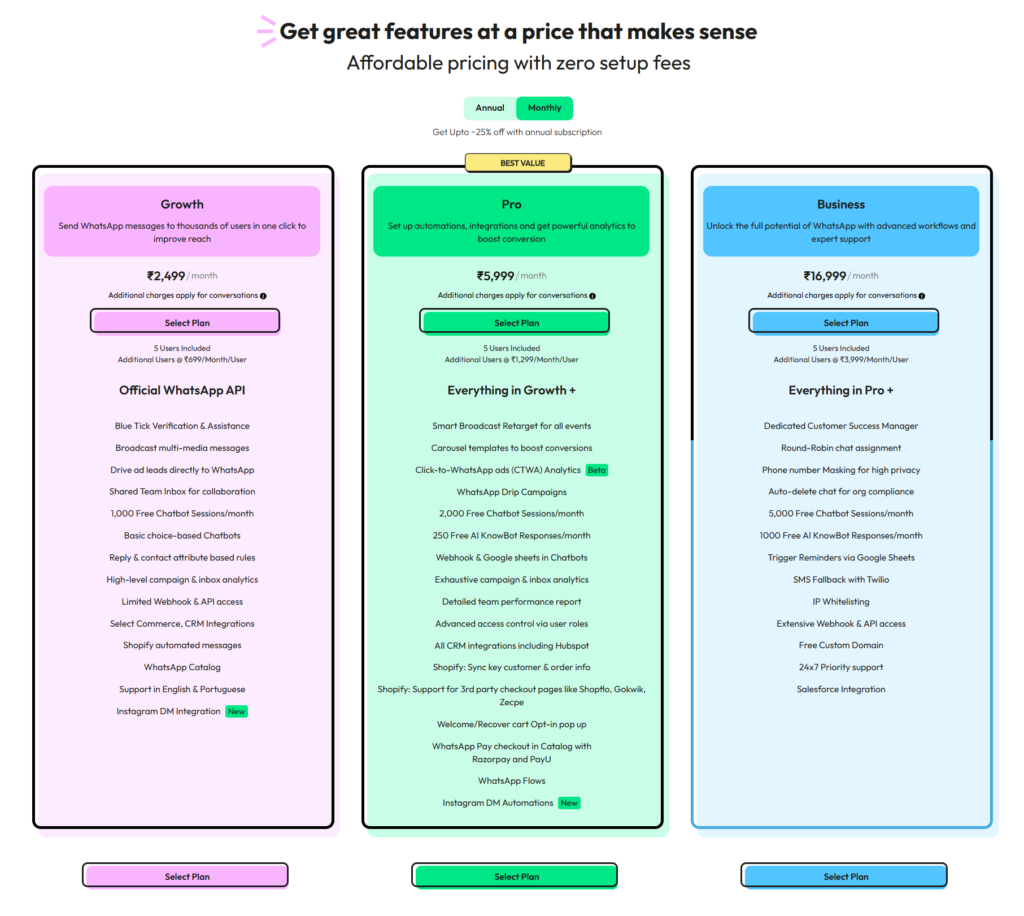
Wati offers three pricing plans like WTbotBuilder they are Growth, Pro, and Business.
The Growth plan is ideal for small businesses, offering basic features like broadcast messages, chatbots, and analytics. Which Starts at Rs. 2,499 a month.
The Pro plan provides advanced features like smart broadcasts, carousel templates, and WhatsApp flows. Which Starts at Rs. 5,999 a month.
The Business plan is tailored for large enterprises, offering dedicated support, advanced automation, and extensive API access. Which Starts at Rs. 16,999 a month.
All plans include a certain number of free chatbot and AI KnowBot sessions, with additional sessions available for purchase. Additional charges may apply for conversations, depending on the type of message and service.
As I mentioned earlier, WTbotBuilder stands out in terms of pricing. Their budget-friendly pricing model, along with a free basic plan, makes it easy for new businesses to get started. Additionally, WTbotBuilder offers significantly more services than Wati at a lower price.
Pricing Comparison
Free Plan
❌No
✔️yes
Subscription fee
Rs. 16,999/- monthly
Rs. 4,999/- Life Time
Pay as you go
❌No
✔️yes
- Trusted by Thousands of Customers
- 30-Days Refund Guarantee
- Priority Support
LTD Advisor
30 N GOULD ST STE R SHERIDAN,
WY 82801